A product quiz. You pay only when the order carries its result.
Wayfind asks shoppers a few questions, shows the products that fit and lets them add everything to the cart in one tap. On the free plan you pay 1% of an order only when its cart carries a quiz result from the last 7 days.
Coming to the Shopify App Store. Free plan: $0 a month plus 1% of proven sales. Studio plan: $29 a month flat.
What it does
An answer to "which one is right for me?"
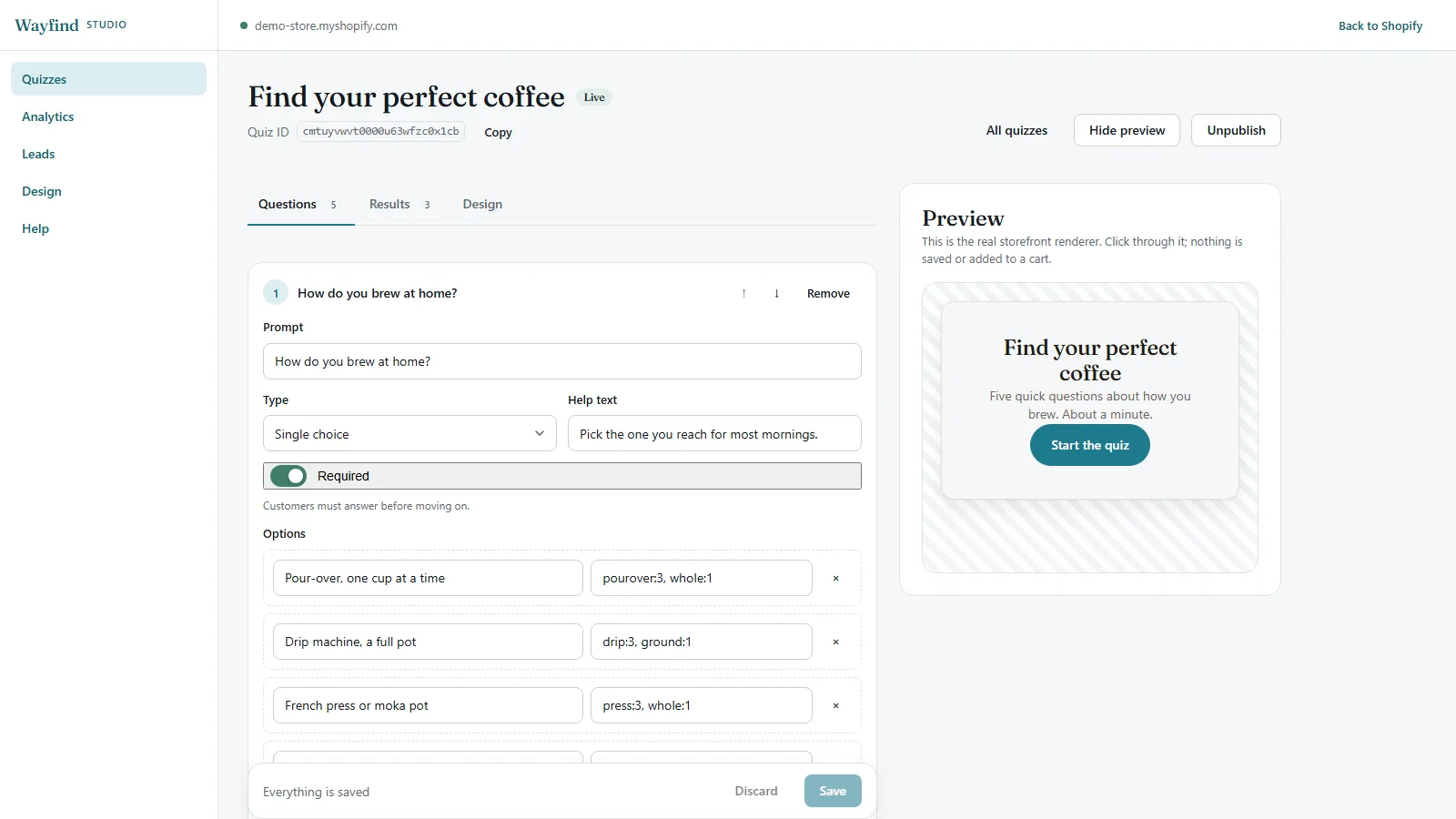
01Questions that fit your catalog
Single choice, multiple choice, image choice and a 1 to 5 scale. Add help text, make a question optional and reorder questions as you go. Quizzes and responses are unlimited.
02Results you write
Each result has a title, a description, an image and the products you pick. Every answer carries tags with weights, and the result whose match tags score highest wins. On a tie, the result higher in your list wins, so you can always tell why someone landed where they did.
03An email step with honest consent
Ask for an email before the result, or leave the step out. If a shopper leaves one, Wayfind adds them to your Shopify customers with the tags wayfind-quiz and quiz-result: plus the result, and saves their answers. It subscribes them to email marketing only when they tick the consent box.
04Numbers for every quiz
Starts, completions, emails, which results people reach, and the orders the quiz was counted for. Leads export as CSV whenever you want them.
What you see
Settings in Shopify admin. The quizzes in Studio.
Home, Settings and Billing are normal Shopify admin pages. Quizzes, the builder with its live preview, analytics, leads and the design defaults live in Studio.
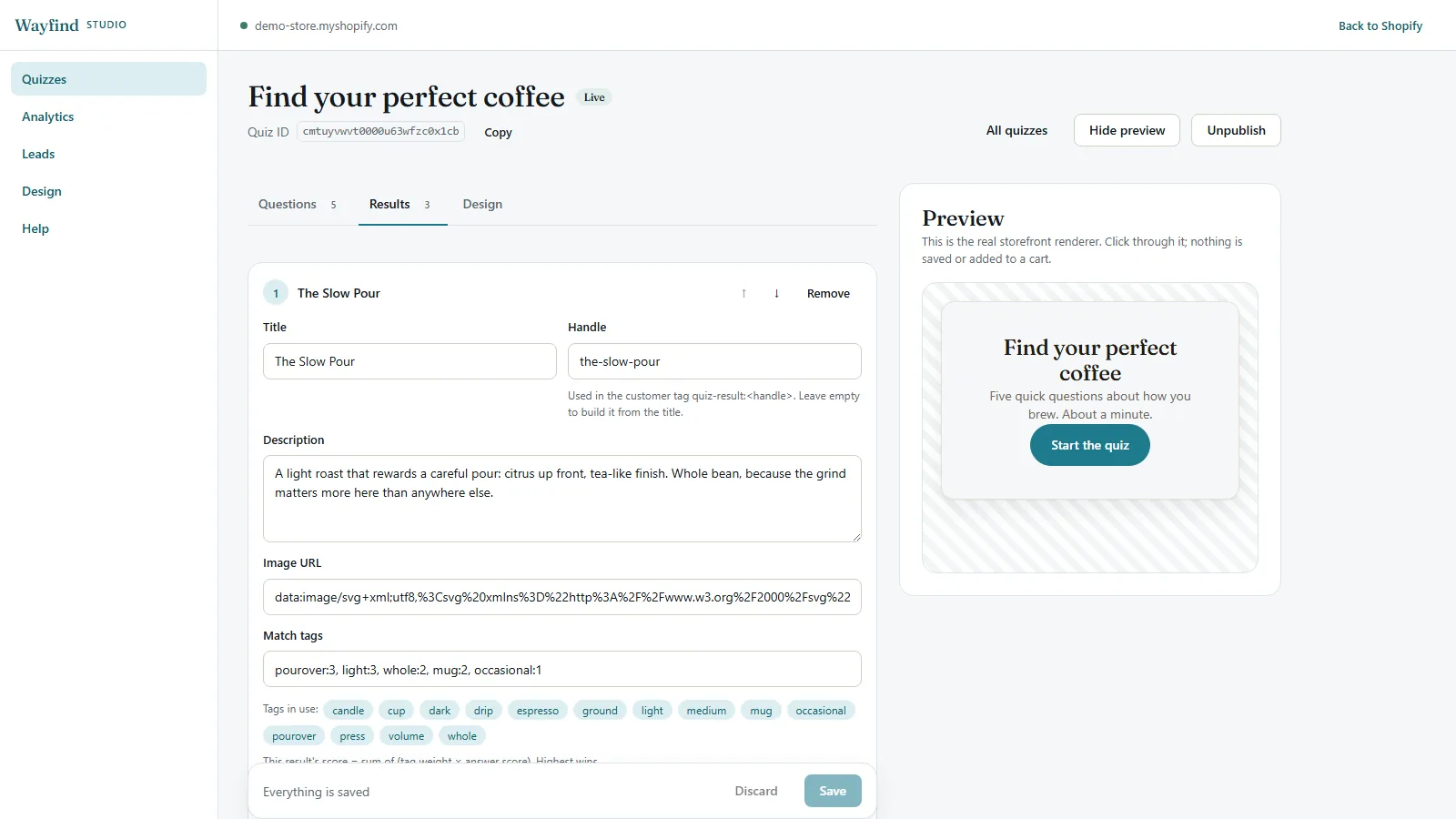
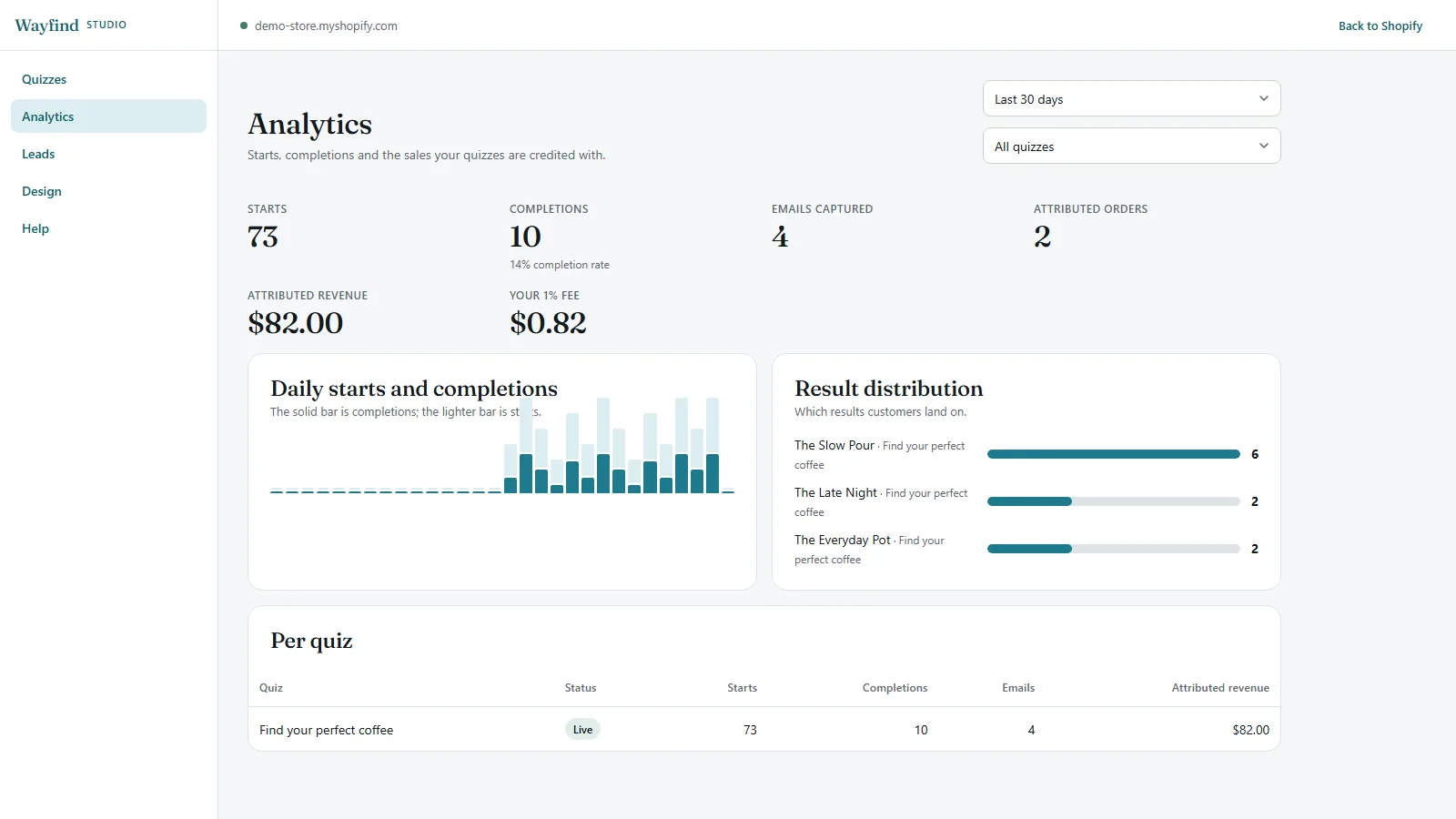
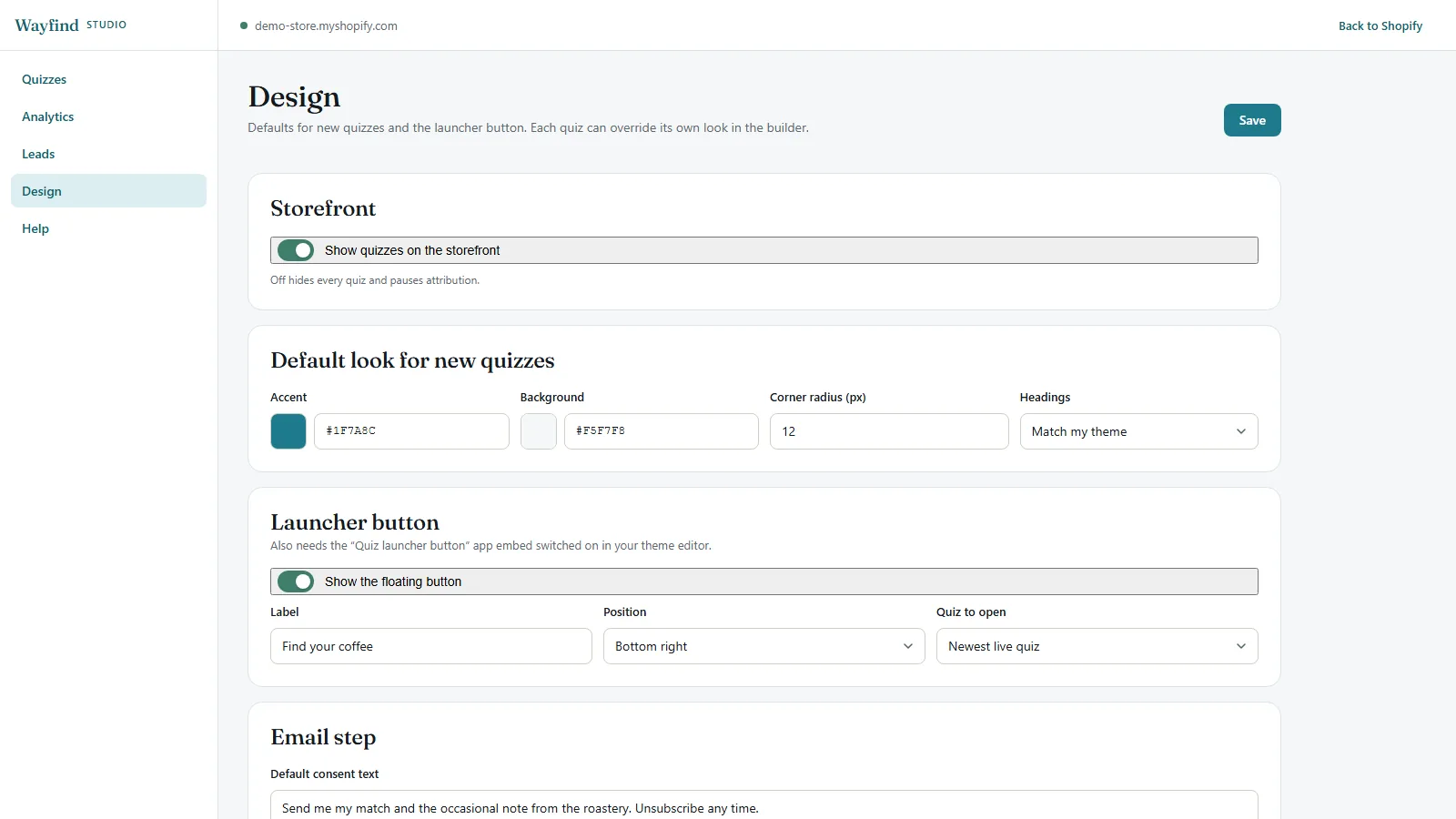
Screens from a demo store with sample data. Select a screen to see it larger.
What shoppers see
A quiz in your theme, or behind a button.
Two pieces you add from Shopify's theme editor, and a link you can share anywhere.
- Wayfind quiz. An app block that shows the quiz inline, in any section of any page.
- Quiz launcher button. An app embed that puts a floating button on every page. It opens the quiz in a popup.
- A quiz link. Any link to your store that ends in
?wf_quiz=and a quiz ID opens that quiz in a popup. Handy for emails and social bios.
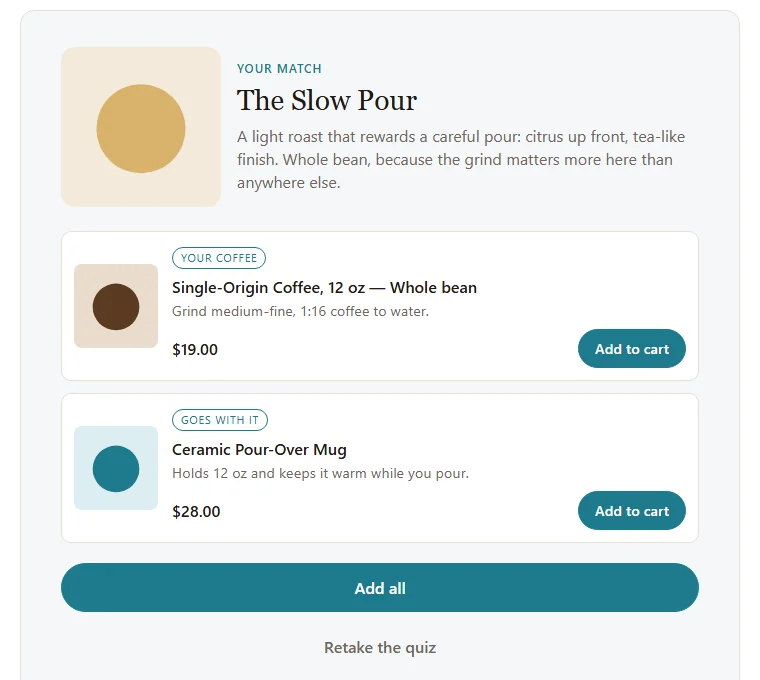
The result page shows the shopper's match, the products you picked with live prices, and an Add all button. The quiz works with the keyboard, the popup closes with Esc, and the script uses no outside libraries, no tracking pixels and no cookies.
Billing
How Wayfind's 1% is counted
This applies on the free plan. On the Studio plan there is no percentage at all.
A quiz has no code to type at checkout, so Wayfind's proof is the result it saves on the cart. That is why it is the one app with a time window.
When a shopper finishes a quiz, Wayfind saves the result on their cart, in a cart attribute named _wf_quiz. An order counts when it carries that result and the quiz was finished in the 7 days before the order.
The amount is the whole order subtotal after discounts, before tax and shipping, in your store currency. Each order counts once. A refund reverses the fee in proportion.
Orders without a quiz result, or with one older than 7 days, are never charged.
Counted Examples that count
- A shopper finishes the quiz, taps Add all and checks out a $47 order.$47.00 counted, fee $0.47
- A shopper finishes the quiz on Monday, comes back to the same cart on Thursday and buys a $30 item the quiz didn't suggest. The whole order counts.$30.00 counted, fee $0.30
Not counted Examples that don't
- A shopper starts the quiz, leaves before the result, then buys.$0.00
- A shopper finished the quiz 9 days before ordering.$0.00
- A shopper who never opened the quiz, however much they spend.$0.00
Setup
Set up in 5 steps
Works with Online Store 2.0 themes. No theme code to edit.
- Install Wayfind and choose a plan. Shopify shows the plan page when you install. Start on the free plan.
- Open Studio and build your quiz. Write the questions, tag the answers, write the results and pick their products. Then press Go live.
- Add the Wayfind quiz block. Online Store, Themes, Customize, then Add block on the page you want and pick Wayfind quiz.
- Add the launcher button if you want it. Under App embeds, switch on Quiz launcher button. Or share a quiz link instead.
- Watch the Billing page. Each counted order shows up there with the amount and the fee.
Questions
Wayfind FAQ
Something else? Email him@thejamiefarrell.com. The Wayfind privacy policy covers what it stores.
Does an order count if the shopper buys something the quiz didn't suggest?
Yes, if the cart carries a quiz result from the last 7 days. The whole order subtotal counts, the same way a PerkJar code counts the whole order. If a fixed price suits you better, the Studio plan is $29 a month with no percentage.
Do shoppers have to leave an email?
Only if you want them to. You choose whether the quiz asks for an email and whether the step can be skipped. Leads are saved in Studio and in your Shopify customers, and they are subscribed to email marketing only when they tick the consent box.
Can I run more than one quiz?
Yes. Quizzes and responses are unlimited. Each block, the launcher and each link can show a different quiz by its ID.
What does it add to my theme?
A small script and stylesheet from the app's theme extension. The rest of the quiz loads only when it is shown. No outside libraries, no tracking pixels and no cookies. It keeps a random visitor ID in the browser only where Shopify's privacy settings allow it.
Can I pause it without touching my theme?
Yes. Turn off Show quizzes on the storefront on Wayfind's Home page or in Studio, under Design. Every quiz is hidden and nothing new is counted until you turn it back on.
Why doesn't Wayfind say ShopLyft inside the app?
Wayfind has its own name and look, because the quiz sits right in front of your shoppers. I build and support it the same way as the other apps, with the same two plans and the same terms.
Want Wayfind when it launches?
Wayfind is coming to the Shopify App Store. Send me a note and I will email you when it is live.