01Before you start
- An Online Store 2.0 theme that supports selling plans. Dawn and every theme in the Shopify Theme Store do.
- New customer accounts are recommended, under Settings, Customer accounts. The subscriptions page lives inside them. Stores on classic accounts get a subscriptions page on their own domain instead.
- For a test run, use the Bogus Gateway or Shopify Payments in test mode. Both can charge the same card again for renewals.
02Install and choose a plan
- Install NextBatch. Approve the access it asks for. It creates subscription plans on your products, manages subscriptions, and reads customers and orders.
- Choose a plan. Shopify shows the app's plan page. Creator is the free plan: $0 a month plus 1% of the sales the app can prove. Studio is $29 a month flat, with no percentage. Both have every feature. Development stores are never charged.
- Land on NextBatch's Home page. It shows what was counted this cycle, your 1% so far, and the Open Studio button.
03Turn on the theme blocks
Create a plan in Studio first (step 4), so the picker has something to show.
- Add the subscription picker. Online Store, Themes, Customize, then a product page. In the product information section, Add block, Apps, NextBatch subscription picker. Place it under the price and Save.
- Add the badge if you want it. The Subscribe & save badge block shows a small chip in product sections.
- Give customers the subscriptions page. New customer accounts: Settings, Customer accounts, Customize, then add the NextBatch portal page to the account menu. Classic accounts: under App embeds, turn on the Manage subscriptions link.
04Set up in Studio
Click Open Studio on NextBatch's Home page.
- Plans. Click New plan and follow four steps: a name such as "Subscribe and save", the frequencies (every few weeks or months), the discount, and the products. NextBatch creates the plan in Shopify, and the product's Purchase options list it.
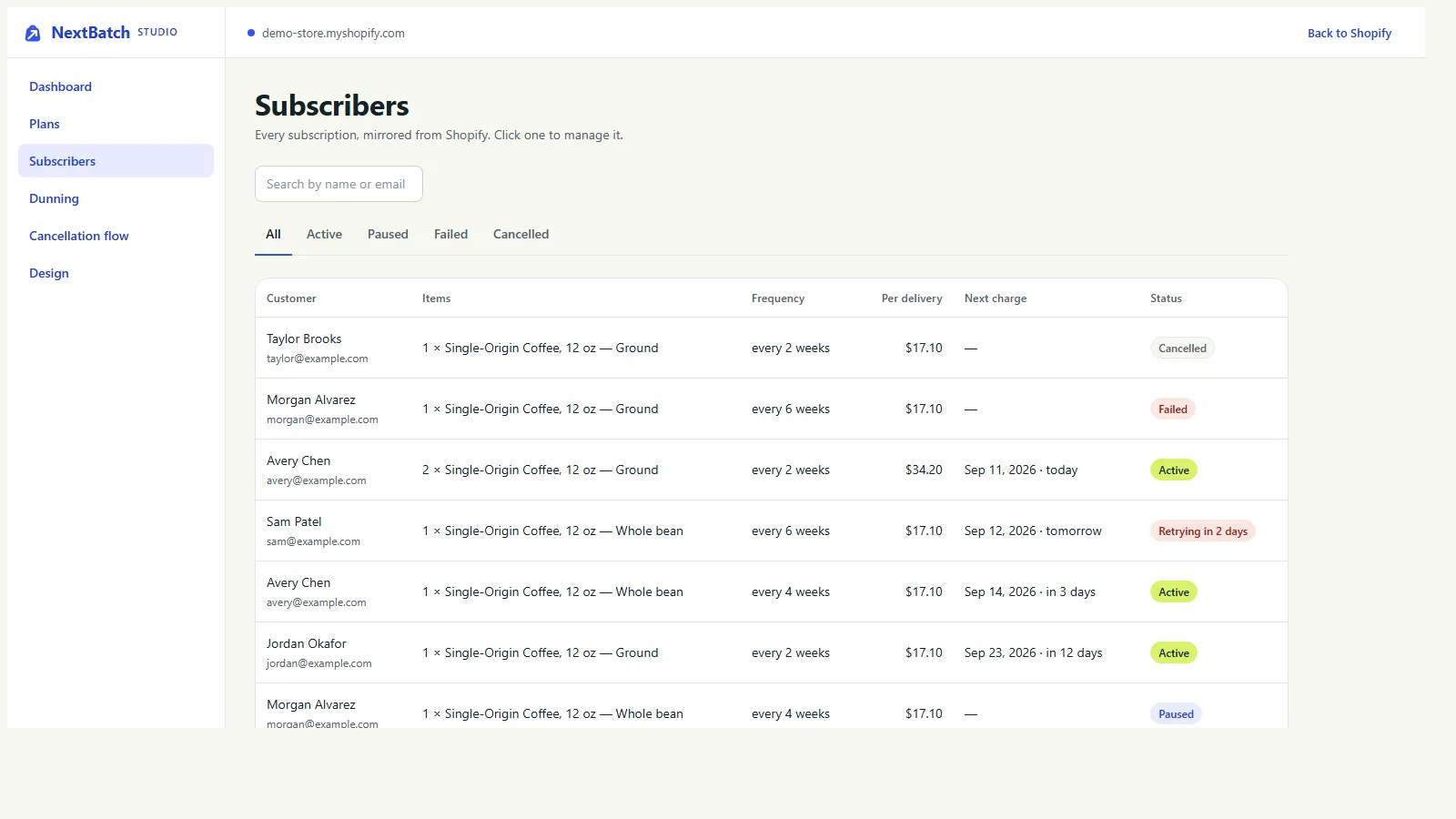
- Subscribers. Every subscription with its items, frequency, price per delivery, next charge and status. Open one to skip, pause, resume, cancel, retry a failed payment, change the frequency or set the next charge date. Customer data requests are on this screen too.
- Dunning. How many times a failed payment is retried, the days between retries, and what happens when retries run out: pause, cancel or keep the subscription. It also lists who needs attention.
- Cancellation flow. The reasons customers can pick, and a save offer for each: skip a delivery, pause, or a discount. Discount offers are recorded for you to apply. NextBatch doesn't change subscription prices on its own yet.
- Design. The wording on the subscriptions page.
05What shoppers see
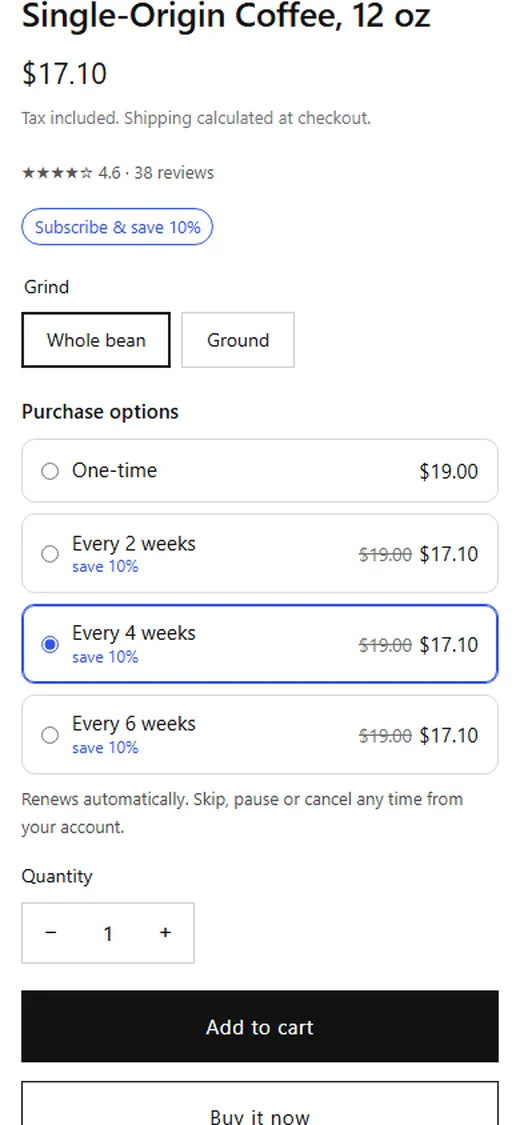
- On the product page: one-time purchase or a delivery frequency, with the price for each. The price updates when they choose.
- Cart and checkout show the subscription terms through Shopify itself.
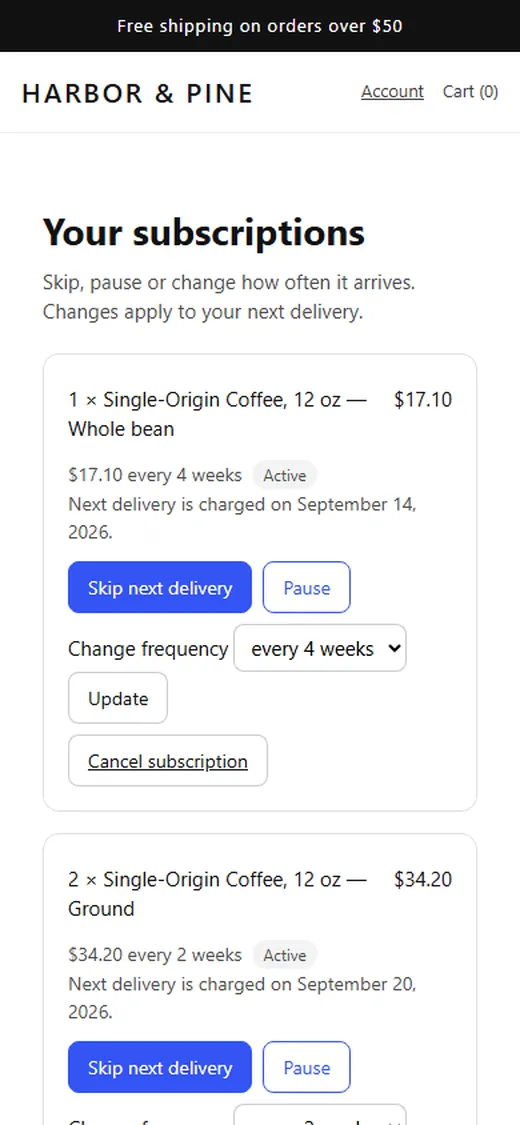
- On the subscriptions page: skip the next delivery, pause, resume, change how often it arrives (to frequencies you offer), or cancel. Cancelling asks why and shows your save offer first.
- Each renewal is a new order in Shopify admin, billed on its next charge date.
06Read the Billing page
Open NextBatch, then Billing in its admin menu. On the free plan an order counts when a line uses a plan NextBatch created, on the first checkout and on every renewal. Only those subscription lines count, after discounts, before tax and shipping.
- Your plan, with a link to change it on Shopify's plan page.
- Last 30 days: sales counted, refunded, orders and your 1% fee.
- Attributed orders: the order, the date, the whole order subtotal next to the part that was counted, any refund, the fee, the source, and whether the charge has reached Shopify. In an order with a one-time item, the counted amount is lower than the order subtotal. That is the one-time item being left out.
07Troubleshooting
- The picker doesn't show on a product page. The product needs a NextBatch plan. Check the product's Purchase options in Shopify admin. The picker also hides on variants that have no NextBatch plan, and it needs a theme that supports selling plans.
- The price shown doesn't change when a shopper picks a subscription. The picker updates the price on Dawn and themes built like it. On other themes the displayed price may stay put, while cart and checkout still use the subscription price. If you edit theme code, adding data-nextbatch-price to the element that shows the price fixes it.
- A renewal hasn't been billed yet. NextBatch checks every hour for subscriptions that are due. A renewal is billed on the first check after its next charge date, so allow up to an hour.
- A renewal payment failed. NextBatch retries on the schedule you set under Dunning. When the retries run out it pauses, cancels or keeps the subscription, depending on your setting. The Dunning screen lists who needs attention.
- Customers can't find their subscriptions. With new customer accounts, add the NextBatch portal page to the account menu. With classic accounts, turn on the Manage subscriptions link under App embeds.
- A customer took a discount to stay, but their price didn't change. Discount save offers are recorded, not applied. Change the price yourself. Studio, Cancellation flow shows the reasons customers gave.
- One-time items aren't on the Billing page. That is on purpose. Only subscription lines on NextBatch plans count.
08Uninstall and what gets deleted
Tell your subscribers first. NextBatch is what bills renewals, so renewals stop when you uninstall it.
- Settings, then Apps and sales channels. Find NextBatch and choose Uninstall.
- It stops right away. The picker and the subscriptions page stop working, renewals stop, and NextBatch stops counting new orders. An order it counted before you uninstalled can still appear on your final bill.
- Tidy up if you like. Remove the picker, badge and link in the theme editor.
48 hours after you uninstall, Shopify sends NextBatch a request to erase your store's data. When it arrives, NextBatch deletes its copies of your plans and subscriptions, billing attempts, cancellation reasons and answers, its billing records and its access to your store. The NextBatch privacy policy has the details.