01Before you start
- An Online Store 2.0 theme. The rewards launcher is an app embed, so it shows on every page.
- Customer accounts turned on, under Settings, Customer accounts. Points belong to a signed-in customer, so shoppers sign in to collect and spend them.
- Points are added when an order is paid. If you capture payments by hand, points arrive when you capture.
02Install and choose a plan
- Install PerkJar. Approve the access it asks for. It reads orders, reads and updates customers, and creates discount codes for referrals and rewards.
- Choose a plan. Shopify shows the app's plan page. Creator is the free plan: $0 a month plus 1% of the sales the app can prove. Studio is $29 a month flat, with no percentage. Both have every feature. Development stores are never charged.
- Land on PerkJar's Home page. It shows what was counted this cycle, your 1% so far, your plan, and the Open Studio button.
03Turn on the theme blocks
- Switch on the launcher. Online Store, Themes, Customize, App embeds. Turn on PerkJar rewards launcher and click Save.
- Add the referral banner if you want it. In any section, Add block, then PerkJar referral banner.
- Add product points if you want them. On a product template, Add block, then PerkJar product points. It shows how many points the item earns.
The launcher's colours, position and words come from Studio, under Design. What you save there overrides the block settings in the theme editor.
04Set up in Studio
Click Open Studio on PerkJar's Home page. It has five screens.
Program
- Status. Storefront features off hides the launcher and stops new points. Program active off pauses the program without touching your theme. Enrol new customers automatically is off by default. When it is on, every new customer account joins and gets the welcome bonus.
- Earning. Points per dollar, counted on the paid subtotal after discounts. A name for points, such as stars. A welcome bonus, and a birthday bonus given once a year when a birthday is on file.
- Expiry. Never, after 180 days with no activity, after 365 days, or after 2 years. The oldest points expire first.
- Referrals. What the friend gets (a percentage or an amount off), an optional minimum subtotal, what the member earns, and whether only the friend's first order counts. I recommend leaving that last one on.
- Rewards to redeem. Click Add reward: a title, a type (an amount off, a percentage off or free shipping), the value, the cost in points, and an optional minimum subtotal. Each redemption creates a single-use code locked to that customer and valid for 30 days. Removing a reward later doesn't break codes already issued.
Members
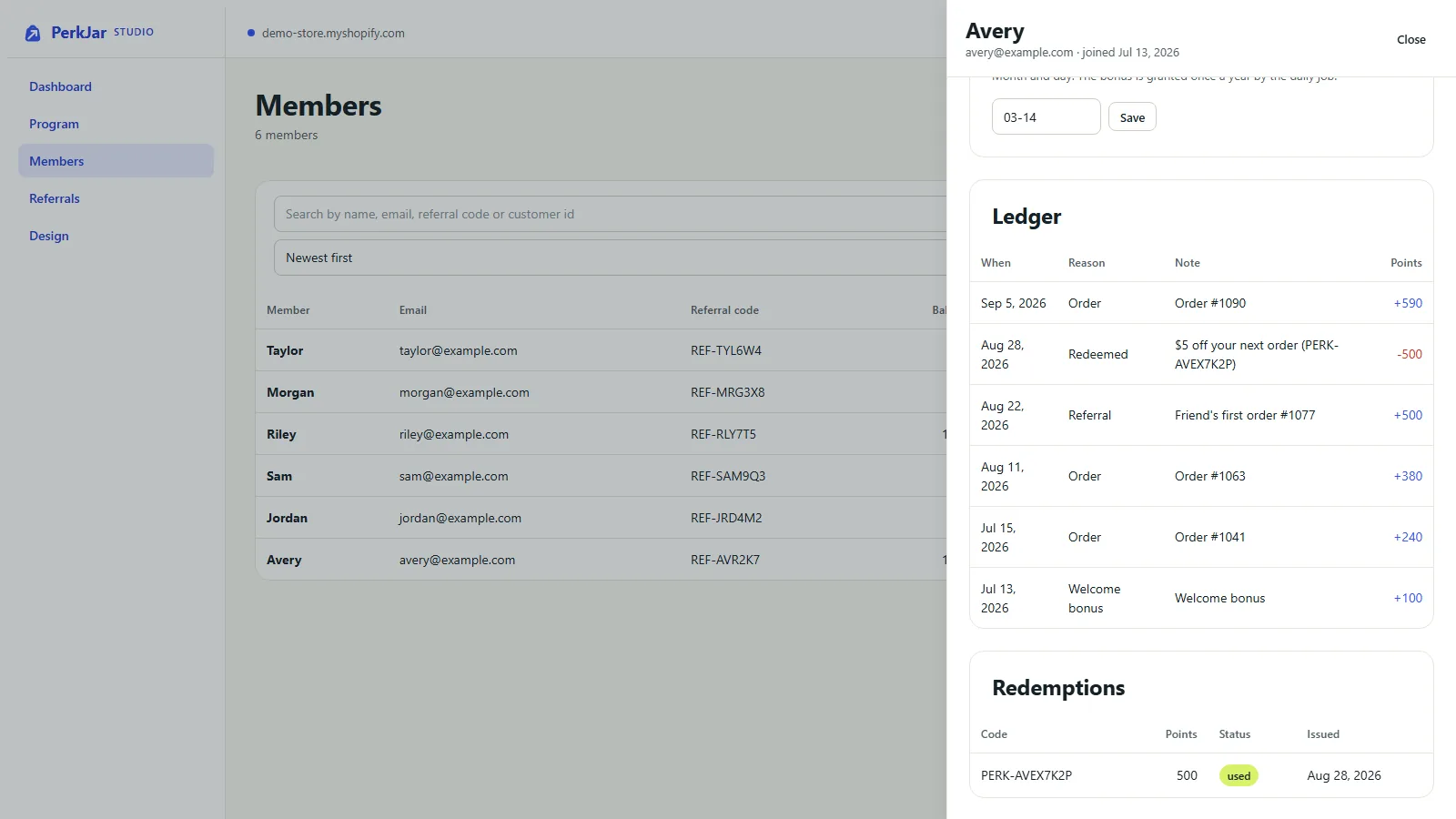
Search by name, email, referral code or customer ID. Open a member to see their ledger, a row for every change in points with the reason. You can adjust a balance by hand with a note, and set a birthday. Customer data requests are on this screen too.
Referrals and Design
Referrals lists every referral as rewarded, pending or blocked, with the reason. Design sets the launcher's colours, position and words, next to a preview.
05What shoppers see
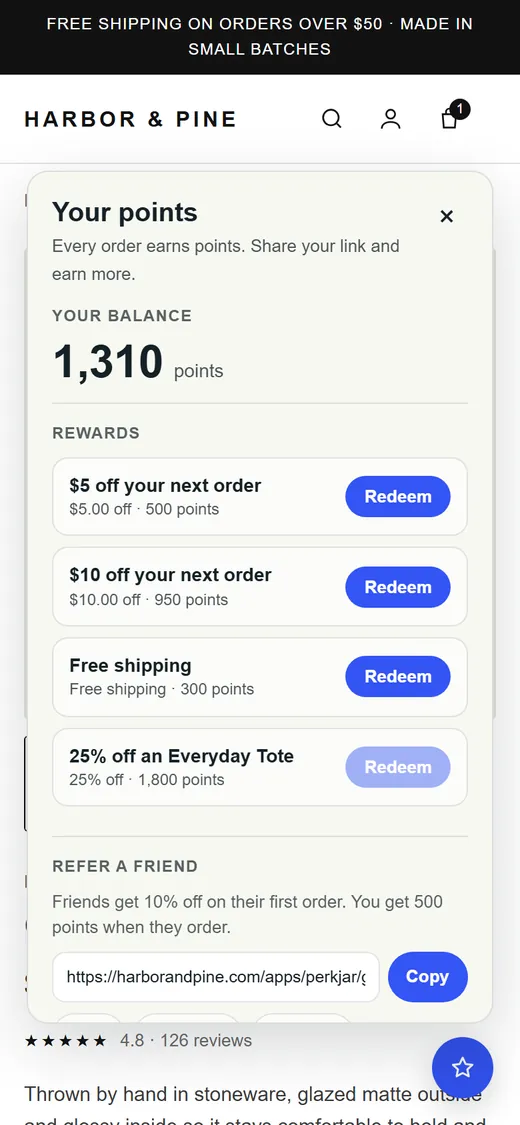
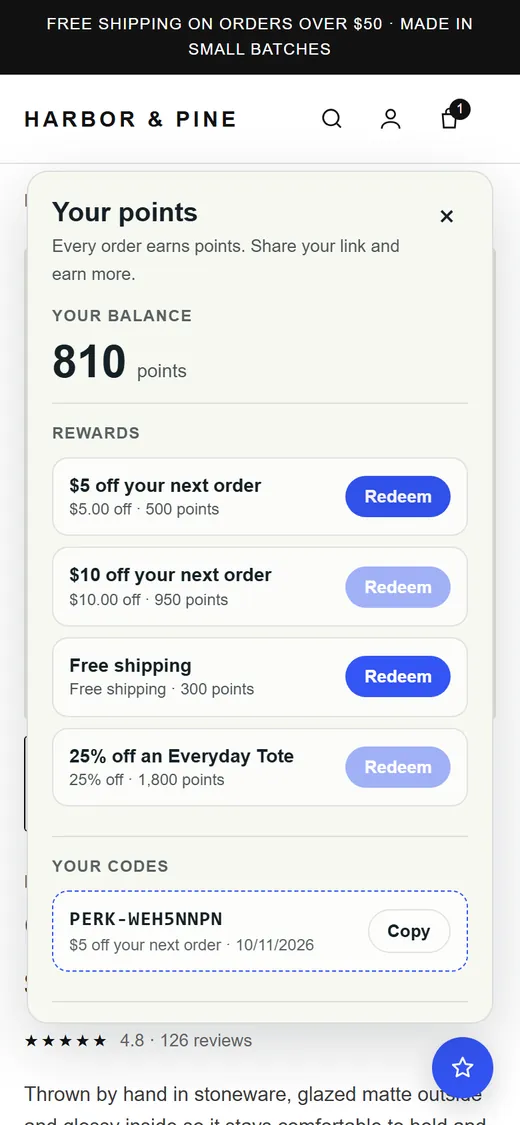
- A rewards button in the corner. The panel shows the balance, ways to earn, rewards to redeem, their codes, recent activity and their referral link, with copy and share buttons.
- Guests see what the program offers and a button to log in or create an account.
- Redeeming shows a single-use code starting with
PERK-, which they enter at checkout. - A friend who opens a member's referral link lands on your store with the friend offer already applied.
- While the program is paused or storefront features are off, the launcher and the product points line are hidden.
06Read the Billing page
Open PerkJar, then Billing in its admin menu. On the free plan an order counts only when it used a REF- referral code or a PERK- reward code that PerkJar issued. The amount is the order subtotal after discounts, before tax and shipping.
- Your plan, with a Change plan link to Shopify's plan page.
- Totals for the last 30 days: sales counted, refunded, counted orders and your 1% fee.
- Counted orders: the order, the date, why it counted (referral code or points reward), the code, the amount counted, any refund, the fee, and Sent or Pending for whether the charge has reached Shopify.
07Troubleshooting
- The launcher doesn't show on my store. Check that PerkJar rewards launcher is on under App embeds and that you saved the theme. Then check Studio, Program. When Storefront features or Program active is off, the launcher and the product points line are hidden on purpose.
- A member ordered, but the order isn't on the Billing page. Only orders that used a REF- or PERK- code count. A member who checks out without a code still earns points, and you pay nothing for that order.
- An order earned no points. Points are added when the order is paid. With manual capture they arrive when you capture the payment. No points are added while Storefront features or Program active is off.
- A referral says pending. The member is rewarded only once the friend's order is paid.
- A referral says blocked. Studio, Referrals shows the reason. PerkJar blocks self-referrals by customer and by email, a second reward for the same friend, orders below your minimum subtotal, and a friend's repeat order when only first orders count. The order still used the REF- code, so it still counts for billing.
- A customer says their reward code doesn't work. Reward codes work once, only for the customer who redeemed them, and for 30 days. They need to check out as that same customer. If the reward has a minimum subtotal, the cart has to reach it.
- Shoppers see a log in button instead of points. That is the guest view. Customer accounts must be on, and the shopper has to be signed in.
08Uninstall and what gets deleted
- Settings, then Apps and sales channels. Find PerkJar and choose Uninstall.
- It stops right away. The launcher and blocks stop working and PerkJar stops counting new orders. An order it counted before you uninstalled can still appear on your final bill.
- Tidy up if you like. Remove PerkJar's blocks in the theme editor. PerkJar's codes were created in your store's Discounts list, so look there for any you no longer want to work.
48 hours after you uninstall, Shopify sends PerkJar a request to erase your store's data. When it arrives, PerkJar deletes your program settings, rewards, members, points history, redemptions, referrals and the codes it recorded, plus its billing records and its access to your store. The PerkJar privacy policy has the details.