01Before you start
- An Online Store 2.0 theme. The link tracker is an app embed.
- A way to pay creators that you already use. RallyCrew records what is owed and what you paid. It never moves money.
- Commission is recorded when an order is paid. If you capture payments by hand, it is recorded when you capture.
02Install and choose a plan
- Install RallyCrew. Approve the access it asks for. It reads customers and orders, and creates a discount code for each creator.
- Choose a plan. Shopify shows the app's plan page. Creator is the free plan: $0 a month plus 1% of the sales the app can prove. Studio is $29 a month flat, with no percentage. Both have every feature. Development stores are never charged.
- Land on RallyCrew's Home page. It shows what was counted this cycle, your 1% so far, clicks, orders and commission owed for the last 30 days, and the Open Studio button.
03Turn on the theme blocks
- Switch on the link tracker. Online Store, Themes, Customize, App embeds. Turn on RallyCrew link tracker and click Save. It counts clicks from creator links.
- Add the apply card if you want applications. In any section, Add block, then RallyCrew apply card. Paste your application page link from Studio, Program into the block's Application page setting.
04Set up in Studio
Click Open Studio on RallyCrew's Home page.
Program
Set the default terms: what a creator's audience gets and what the creator earns. You can change both for each creator. This is also where you turn the application page on and copy its link, set the click window, and write payout notes. Customer data requests are on this screen too.
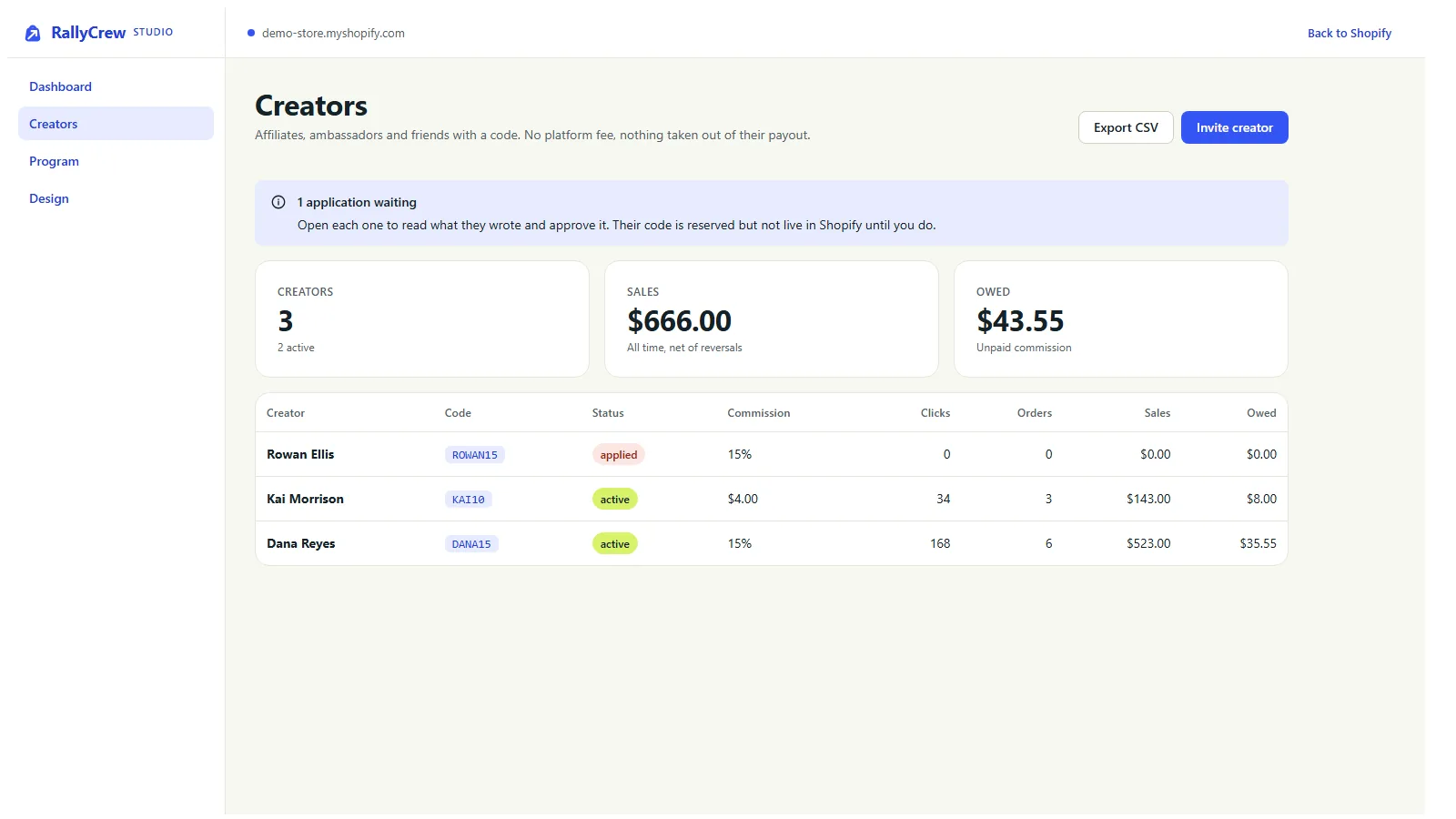
Creators
- Invite creator. A name, an email and a code such as
DANA15. Then the discount their audience gets, and their commission as a percentage or a flat amount. Optional: first orders only, and a minimum subtotal. RallyCrew creates the code in Shopify, and it shows in your Discounts list. - Open a creator. Under Send them these you will find their tracked link and the link to their private page. You also see their clicks, orders, what they are owed and their payout handle.
- Pause switches their code off in Shopify. Resume switches it back on.
- Mark paid records a payout you made. CSV exports cover creators, orders and payouts.
- Applications show what someone wrote. Their code is reserved but not created in Shopify until you approve.
Design
The look of the creator page and the application page: an accent colour, an optional logo and the welcome line a creator reads first.
05What shoppers and creators see
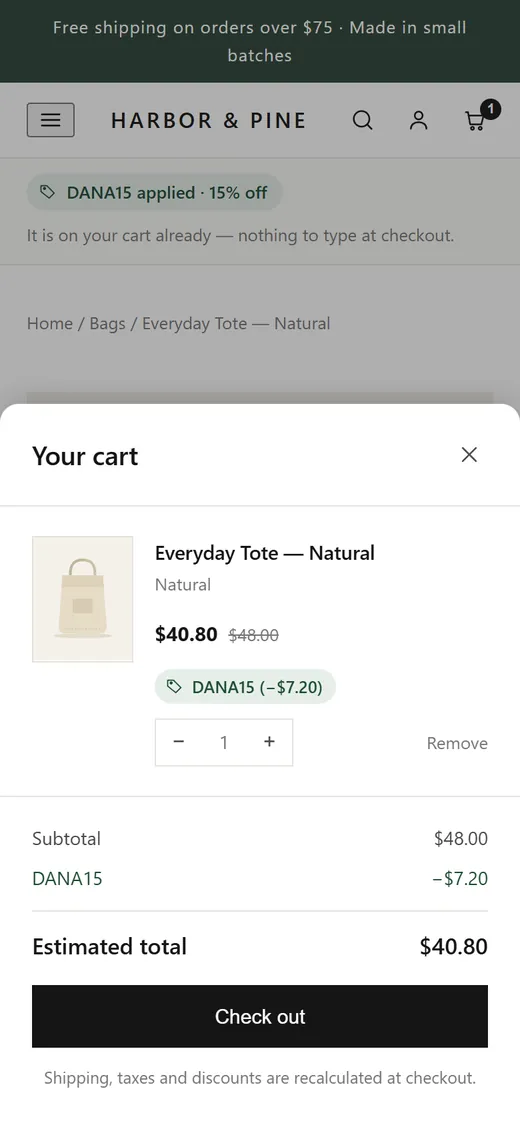
- A shopper who follows a creator's link lands on your store with the creator's code already applied to the cart. The click is counted.
- A shopper can also type the code at checkout without ever clicking a link.
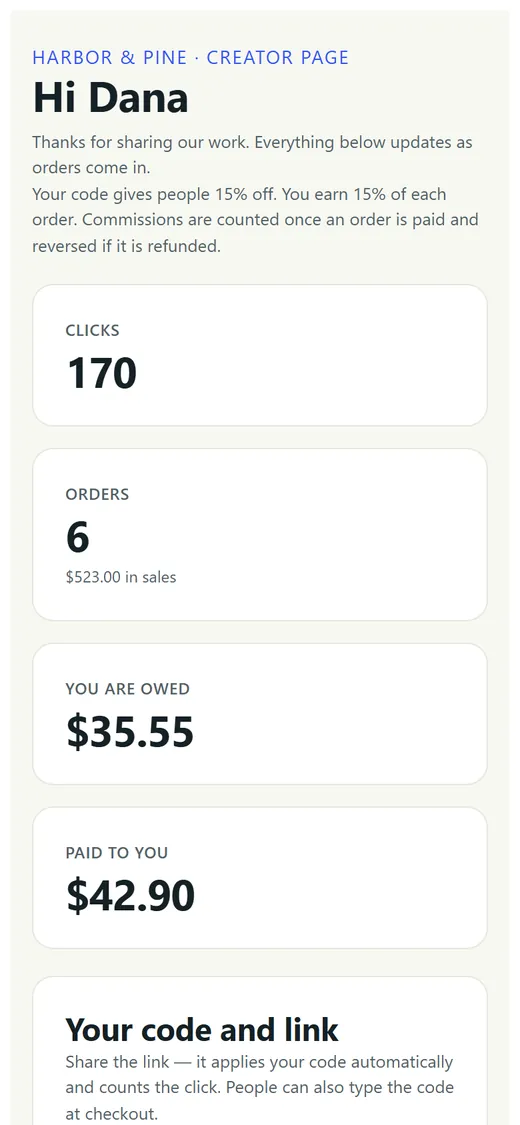
- Each creator has a private page with their clicks, orders, what they are owed and what you paid. It shows order numbers, dates and amounts, never customer names, emails or addresses. They add their PayPal or Venmo handle there. The link is long and random, and no account is needed.
- The tracker stores a first-party cookie only when the shopper's consent choice allows it. The click is counted either way, and billing rides on the code, not the cookie.
06Read the Billing page
Open RallyCrew, then Billing in its admin menu. On the free plan an order counts when it used a creator code RallyCrew issued, typed in or applied by a link. The amount is the order subtotal after discounts, before tax and shipping. This 1% is separate from the commission you pay creators.
- Your plan, with a link to change it on Shopify's plan page.
- Totals for the last 30 days: sales counted, refunded, counted orders and your 1% fee.
- Counted orders: the order, the date, the code, the amount counted, any refund, the fee, and whether the charge has reached Shopify.
07Troubleshooting
- An order used a creator code but no commission was recorded. Commission is recorded once the order is paid. None is recorded when the creator bought with their own code (matched by email or customer), when the creator is paused or not yet approved, when the subtotal is below their minimum, or when first orders only is on and the buyer has ordered before. Studio shows the reason.
- An order is missing from the Billing page. It counts only when a RallyCrew code was on the order at checkout. If the shopper removed it or used a different code, it isn't counted, even if they clicked a creator link.
- Clicks aren't being counted. Check that RallyCrew link tracker is on under App embeds and that you saved the theme.
- A creator's code is rejected at checkout. Check the creator's status in Studio. Pausing a creator switches their code off in Shopify. Resume them to switch it back on.
- The application page says the store isn't accepting applications. Turn the application page on in Studio, Program. It is also closed while the program is paused.
- The apply card's button goes to the wrong place. Paste the application page link from Studio, Program into the block's Application page setting.
- A refund lowered a creator's commission. That is on purpose. A refund reverses unpaid commission in proportion, along with the 1% fee. Commission you already marked as paid is left as it is.
08Uninstall and what gets deleted
- Export first if you want a record. Studio's CSV exports cover creators, orders and payouts.
- Settings, then Apps and sales channels. Find RallyCrew and choose Uninstall. The tracker and apply card stop working and RallyCrew stops counting new orders. An order it counted before you uninstalled can still appear on your final bill.
- Tidy up if you like. Remove the apply card in the theme editor. Creator codes were created in your store's Discounts list, so look there for any you no longer want to work.
48 hours after you uninstall, Shopify sends RallyCrew a request to erase your store's data. When it arrives, RallyCrew deletes your creators, their codes, clicks, commission records and payouts, your program settings, its billing records and its access to your store. Creator pages and the application page stop working. The RallyCrew privacy policy has the details.